Request access Log In
REAP MCP · Private preview

Give your AI a
real estate analyst.

Connect Claude, ChatGPT or your own agents straight into REAP. Underwrite any address, pull your pipeline and write deals back — without leaving the tool you already work in.

Enterprise add-on · limited preview seats

Claude · REAP connected
You4214 W Virginia Ave — I can buy it at $1.95M. Does it work?
value_property — pulling comps & ARV
underwrite_deal — modeling hold at $1.95M
save_deal — written to your pipeline
78REAP Score · Hold
Year-1 NOI$184,600
Cap rate on basis9.5%
DSCR @ 7.25%1.34×
Cash-on-cash11.2%
ClaudeIt clears coverage with room. The risk is the rent assumption — you need $1.18/SF and in-place is $0.96.
An isometric field of parcels. REAP scores every one; only three clear.
One month of listings, scored.  Most parcels never clear. Your assistant finds the ones that do — without you opening a spreadsheet.
Works with Claude Claude Code ChatGPT Cursor Any MCP client Your own agents
What you get

Not an export. A connection.

REAP MCP is a Model Context Protocol server. You paste one URL and key into your AI client, and REAP becomes a set of tools your assistant can call on its own — in the middle of a sentence, without you switching windows.
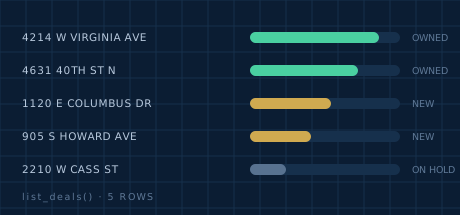
Pipeline rows being read with a scanning sweep
READ

Your pipeline, in context

Your assistant can see the deals you already have, so it answers about your portfolio instead of guessing.
  • List and search deals by city, status, price band
  • Pull full underwriting on one address
  • Unit-level rent roll and documents
  • Pipeline totals by status
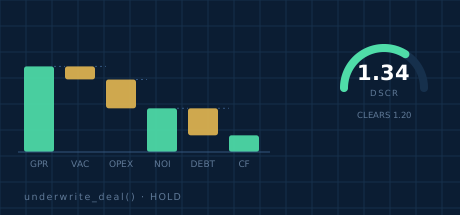
A cash flow waterfall and a debt coverage gauge
UNDERWRITE

The engine, on any address

The same models behind the REAP Score, called directly. Flip or hold, on a deal you have never entered.

  • REAP Score with the reasoning behind it
  • Cash flow, DSCR, cap rate, cash-on-cash
  • ARV and rental comps
  • Financing and capital-stack scenarios
A ledger receiving a newly written deal record
WRITE

Deals go back in

Analysis that stays in a chat window is lost work. Your assistant writes results into REAP where your team sees them.

  • Create a deal from a conversation
  • Update assumptions and status
  • Attach the analysis to the record
  • Every write logged and attributed
The output

It doesn't hand back a number.

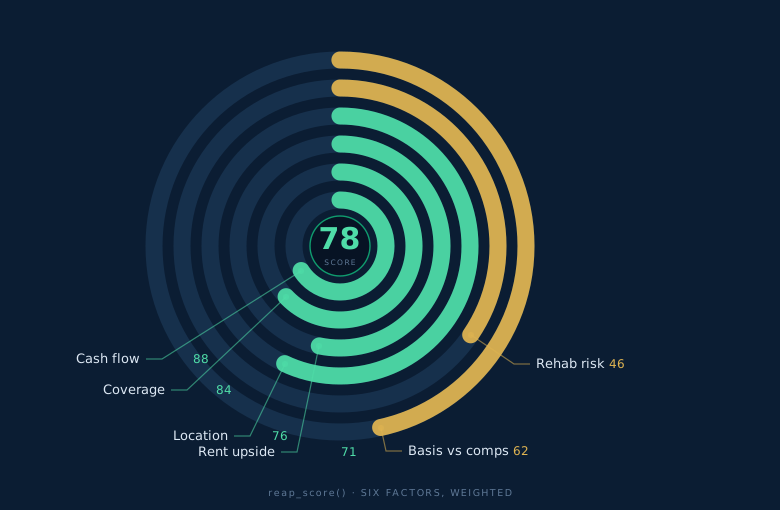
A score on its own is a guess you can't check. Every call returns the working underneath it — where the rent goes, what drove the score, and what breaks the deal.
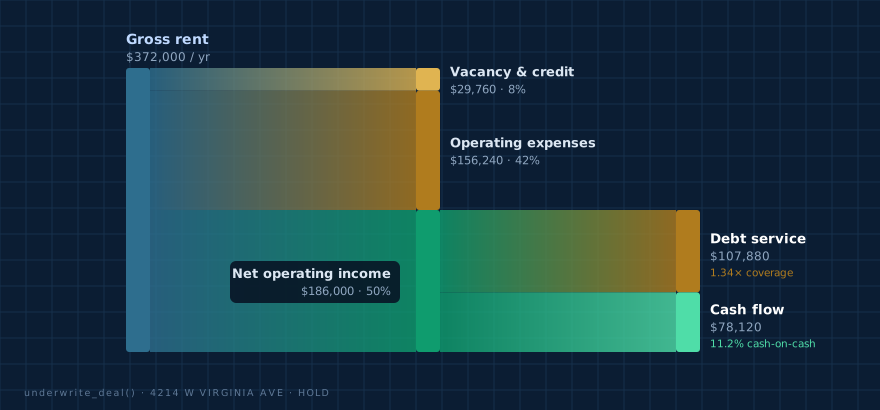
A flow diagram tracing gross rent through vacancy, operating expenses and debt service down to cash flow
Where the rent actually goes.  $372,000 in, $78,120 out the bottom — every dollar traced.
A radial breakdown of the six weighted factors behind a REAP Score of 78
Why it scored 78.  Six factors, weighted, each one auditable.
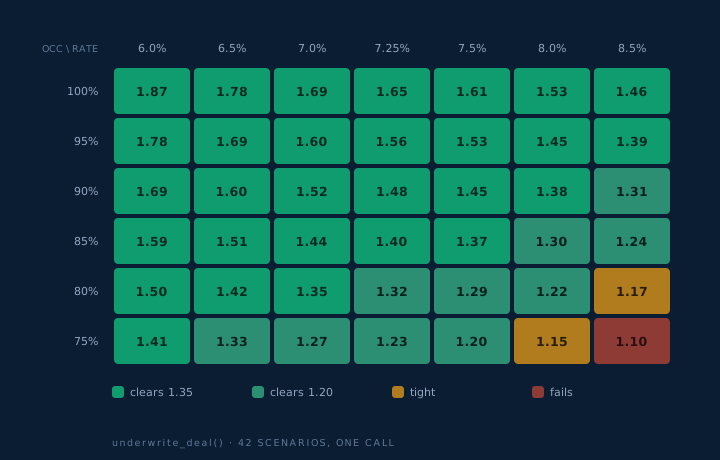
A stress grid of debt service coverage across interest rates and occupancy levels
Where it breaks.  42 rate-and-occupancy scenarios from a single call.
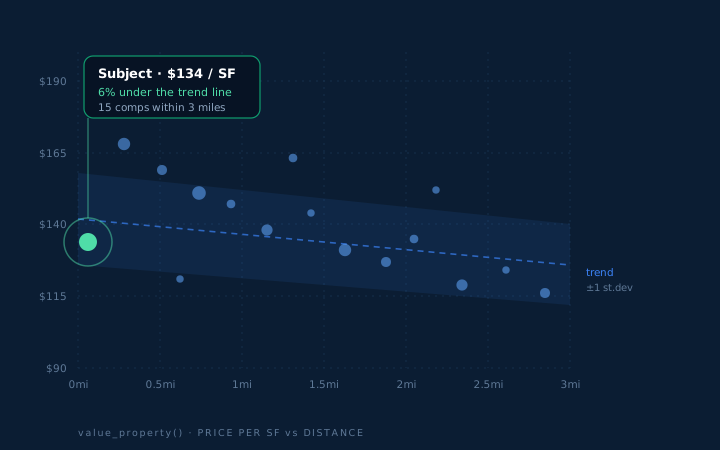
A scatter of comparable sales by price per square foot against distance, with the subject highlighted
What it's worth, and against what.  Fifteen comps, a trend line, and the subject placed on it.
Tool reference

Everything your agent can call.

Six read tools are running in production today. The underwriting and write tools ship to preview accounts at launch.
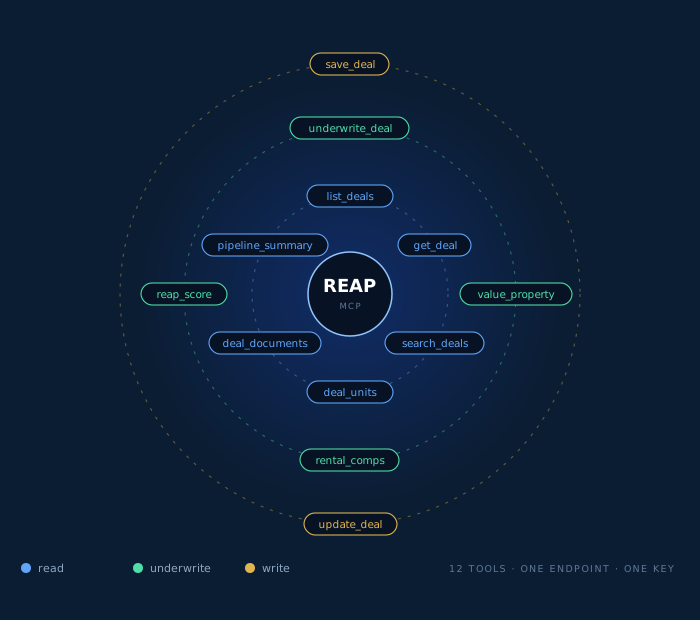
Twelve REAP tools arranged in read, underwrite and write orbits around the core
Twelve tools, three scopes.  Your assistant picks which to call. You decide which it may reach.
Your AI client Claude · ChatGPT · Cursor your own agents REAP MCP key → org scope read / write check REAP engine underwriting · comps REAP Score Your deals pipeline of record team sees it answer returns in the same sentence call auth write
One tool call, end to end. Your key decides what the engine is allowed to touch.
ToolWhat it doesStatus
list_dealsDeals in your pipeline, filtered by statusLive
get_dealOne deal by address: full underwriting, units, recent activityLive
search_dealsSearch by city, status, price band or property typeLive
deal_unitsUnit-level rent roll, in-place versus marketLive
deal_documentsDocuments attached to a dealLive
pipeline_summaryCounts and dollar totals by statusLive
underwrite_dealRun flip or hold underwriting on any address and priceAt launch
value_propertyARV, price per SF and valuation bandAt launch
rental_compsComparable rents with source and distanceAt launch
reap_scoreThe score plus the factors that produced itAt launch
save_dealWrite a new deal into your REAP pipelineAt launch
update_dealUpdate assumptions, status or notes on an existing dealAt launch

Preview accounts get the full set. Tool names and schemas may change before general availability — we version the endpoint so nothing breaks underneath you.

Setup

Three steps, about five minutes.

No SDK, no integration project, no engineer required for the standard clients.

1

Get your key

We issue a key scoped to your organization. It sees your deals and nothing else.

2

Add the connector

Paste the URL into your AI client's connector settings, or into your agent's config file.

3

Ask in plain English

"Underwrite 4214 W Virginia at $1.95M." Your assistant picks the tools itself.

// Any MCP-compatible client
{
  "mcpServers": {
    "reap": {
      "type": "url",
      "url": "https://mcp.getreap.ai/v1?key=YOUR_KEY"
    }
  }
}
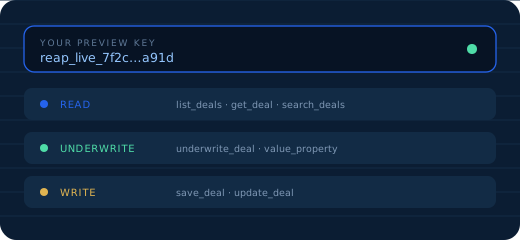
A scoped preview key with its read, underwrite and write permissions
Your key, and exactly what it is allowed to reach.
Control

Your data stays yours.

A key that reaches into your deal record deserves more than a shared password. Every one is scoped, logged and revocable on its own.
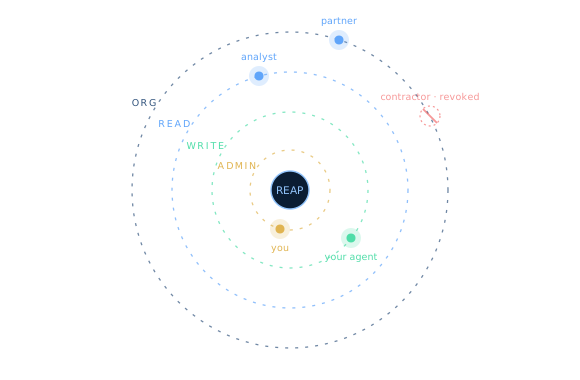
Concentric permission scopes with keys at each level and one key revoked
Four scopes. One key per person. Revoke without touching anyone else.

A key that reaches your deal record is not a password to hand around. Every key sits at exactly one scope, carries its own tool list, and dies on its own.

The contractor's key above was revoked at 4:12pm. Nobody else re-authenticated. Nothing else moved.

Scoped per organization

A key only ever returns your organization's deals. There is no cross-tenant read path.

Read and write separated

Issue read-only keys to analysts and partners. Write access is granted per key, not by default.

Every call logged

Tool, arguments, timestamp and key, visible to your admins. You can see what your agents did.

Revoke in one click

Kill a key without rotating anyone else's. Contractor leaves, key dies, nothing else moves.

Not used for training

Your deals are not used to train models. Ours or anyone else's.

Rate limited and capped

Per-key ceilings so a runaway agent cannot drain your credits overnight.

Always on

It doesn't keep your hours.

An agent with tools works the listing that lands at 11pm. This is one real week of calls, by hour.
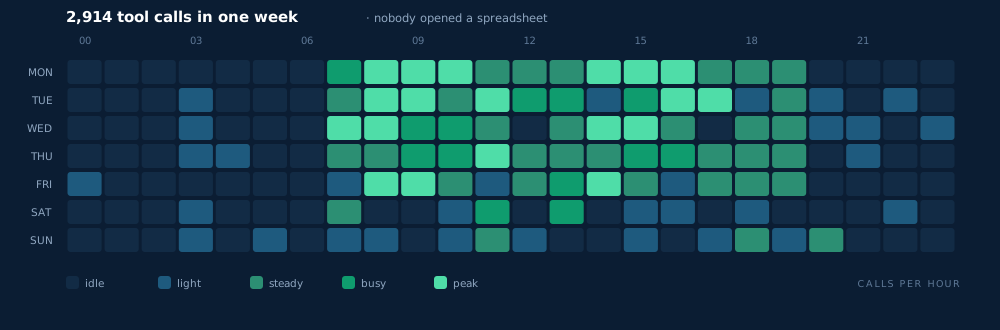
A heat calendar of tool calls by hour across one week
2,914 calls in seven days.  Weekends included. No spreadsheet opened.
Pricing

Built for teams running real volume.

MCP access is an Enterprise capability. If you are underwriting a handful of deals a month, Pro is the better fit — start there and move up when the volume justifies it.

Enterprise add-on

REAP MCP & API access

$500/ month, on top of Enterprise

Enterprise starts at $1,500/mo, annual contract.
  • Full MCP toolset — read, underwrite and write
  • Full REST API alongside it
  • Unlimited scoped keys for your team
  • Usage dashboard and audit log
  • 200+ Underwood credits per month included
  • Named support contact and onboarding call
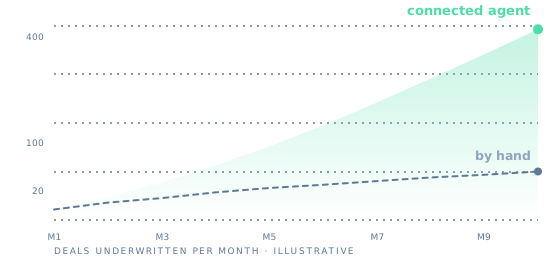
Deals underwritten per month, by hand versus through a connected agent

Also available on Enterprise

White-label+$500/mo
SSO / SAML+$300/mo
Investor portal+$400/mo
Data warehouse export+$300/mo
Additional 100 credits+$200/mo
Compare all plans
Private preview

Get on the list.

We are onboarding preview accounts in small batches so every one gets a real setup call. Tell us what you would build and we will come back with a slot.

  • Reply within two business days
  • 30-minute setup call, key issued live
  • Preview pricing locked for 12 months
Deal pipeline rows being read by a connected assistant

No spam. We use this to size the preview and nothing else.

You're on the list.

We'll email you within two business days with a preview slot and your setup call link. Questions in the meantime: hello@getreap.ai

Questions

Before you ask.

What is MCP, in one sentence?
Model Context Protocol is an open standard for connecting AI assistants to outside systems. Instead of copying data into a chat, the assistant calls the system directly and gets live answers.
Do I need a developer?
Not for Claude, ChatGPT, Cursor or any standard MCP client — it is a URL and a key pasted into a settings screen. You would want one only if you are wiring REAP into your own agents or internal software.
Does it work with ChatGPT?
Yes. Any client that speaks MCP over HTTP can connect. We test against Claude, Claude Code, ChatGPT and Cursor.
Can my AI change my deals without me knowing?
Only if you issue a key with write access. Read-only keys cannot write, and every write is logged with the key that made it, so you can see exactly what changed and who did it.
Is this the same as the REST API?
They share the same engine and the same $500/mo add-on. MCP is for AI clients that pick their own tools; REST is for software you are writing yourself. You get both.
What happens to my data?
It stays in your REAP account. We do not sell it, and we do not use your deals to train models.
Can I try it on a Pro plan?
Not today — MCP is Enterprise only. Get on the list anyway. If preview demand from Pro accounts is strong we will look at a smaller tier, and you will hear about it first.
Private preview

Stop pasting deals into a chat window.

Give your assistant the engine instead. Preview seats are limited and onboarding is hands-on.

Request access